Spring Cloud Tutorials – Introduction to Spring Cloud Config Server
Spring Boot provides a lot of flexibility in externalizing configuration properties via properties or YAML files. We can also configure properties for each environment (dev, qa, prod, etc.) separately using profile-specific configuration files such as application.properties, application-dev.properties, application-prod.properties, etc. But once the application is started, we cannot update the properties at runtime. If we change the properties, we need to restart the application to use the updated configuration properties.
Also, in the context of a large number of MicroService-based applications, we want the ability to configure and manage the configuration properties of all MicroServices from a centralized place.
Solution
We can use Spring Cloud Config Server (http://cloud.spring.io/spring-cloud-static/Dalston.SR2/#_spring_cloud_config) to centralize all the application’s configuration and use the Spring Cloud Config Client module from the applications to consume configuration properties from the Config Server. We can also update the configuration properties at runtime without needing to restart the application.
Many of the Spring Cloud modules can be used in Spring Boot applications even though you are not going to deploy your application on any Cloud platforms such as AWS, Pivotal CloudFoundry, etc.
Spring Cloud Config Server
Spring Cloud Config Server is nothing but a Spring Boot application with a configured configuration properties source. The configuration source can be a git repository, an svn repository, or a Consul service (https://www.consul.io/).
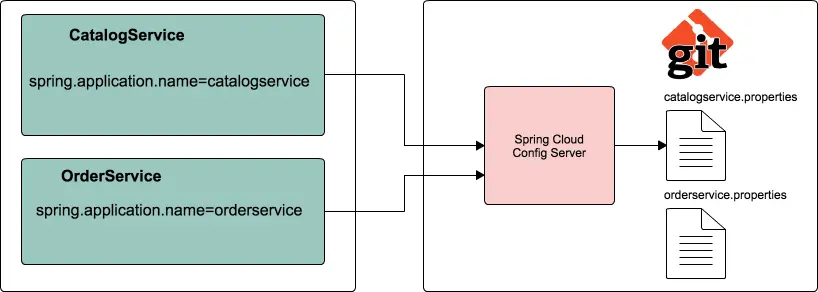
In this post, we are going to use a git repository as the configuration properties source.
Git Config Repository
Create a git repository to store properties files. I have created a repository config-repo on GitHub, i.e., https://github.com/sivaprasadreddy/config-repo.git.
Suppose we are going to develop two Spring Boot applications, catalog-service and order-service. Let us create configuration files catalogservice.properties and orderservice.properties for catalog-service and order-service, respectively.
config-repo/catalogservice.properties
spring.datasource.driver-class-name=com.mysql.jdbc.Driver
spring.datasource.url=jdbc:mysql://localhost:3306/catalog
spring.datasource.username=root
spring.datasource.password=admin
config-repo/orderservice.properties
spring.rabbitmq.host=localhost
spring.rabbitmq.port=5672
spring.rabbitmq.username=guest
spring.rabbitmq.password=guest
We can also create profile-specific configuration files such as catalogservice-dev.properties, catalogservice-prod.properties, orderservice-dev.properties, and orderservice-prod.properties.
config-repo/catalogservice-prod.properties
spring.datasource.driver-class-name=com.mysql.jdbc.Driver
spring.datasource.url=jdbc:mysql://appsrv1:3306/catalog
spring.datasource.username=appuser46
spring.datasource.password=T(iV&#)X84@1!
config-repo/orderservice-prod.properties
spring.rabbitmq.host=srv245.ind.com
spring.rabbitmq.port=5672
spring.rabbitmq.username=admin23
spring.rabbitmq.password=uY7&%we@1!
Now commit all the configuration properties files in the config-repo git repository.
Spring Cloud Config Server Application
Let us create a Spring Boot application, spring-cloud-config-server, from http://start.spring.io or from your favorite IDE by selecting the starters Config Server and Actuator.
This will generate the Maven project with the following pom.xml.
<?xml version="1.0" encoding="UTF-8"?>
<project xmlns="http://maven.apache.org/POM/4.0.0"
  xmlns:xsi="http://www.w3.org/2001/XMLSchema-instance"
	xsi:schemaLocation="http://maven.apache.org/POM/4.0.0
  http://maven.apache.org/xsd/maven-4.0.0.xsd">
	<modelVersion>4.0.0</modelVersion>

	<groupId>com.sivalabs</groupId>
	<artifactId>spring-cloud-config-server</artifactId>
	<version>1.0.0-SNAPSHOT</version>
	<packaging>jar</packaging>
	<name>spring-cloud-config-server</name>

	<parent>
		<groupId>org.springframework.boot</groupId>
		<artifactId>spring-boot-starter-parent</artifactId>
		<version>1.5.6.RELEASE</version>
		<relativePath/>
	</parent>

	<properties>
		<project.build.sourceEncoding>UTF-8</project.build.sourceEncoding>
		<project.reporting.outputEncoding>UTF-8</project.reporting.outputEncoding>
		<java.version>1.8</java.version>
		<spring-cloud.version>Dalston.SR2</spring-cloud.version>
	</properties>

	<dependencies>
		<dependency>
			<groupId>org.springframework.boot</groupId>
			<artifactId>spring-boot-starter-actuator</artifactId>
		</dependency>
		<dependency>
			<groupId>org.springframework.cloud</groupId>
			<artifactId>spring-cloud-config-server</artifactId>
		</dependency>
		<dependency>
			<groupId>org.springframework.boot</groupId>
			<artifactId>spring-boot-starter-test</artifactId>
			<scope>test</scope>
		</dependency>
	</dependencies>

	<dependencyManagement>
		<dependencies>
			<dependency>
				<groupId>org.springframework.cloud</groupId>
				<artifactId>spring-cloud-dependencies</artifactId>
				<version>${spring-cloud.version}</version>
				<type>pom</type>
				<scope>import</scope>
			</dependency>
		</dependencies>
	</dependencyManagement>

	<build>
		<plugins>
			<plugin>
				<groupId>org.springframework.boot</groupId>
				<artifactId>spring-boot-maven-plugin</artifactId>
			</plugin>
		</plugins>
	</build>
</project>
To make our Spring Boot application a Spring Cloud Config Server, we just need to add the @EnableConfigServer annotation to the main entry point class and configure the spring.cloud.config.server.git.uri property pointing to the git repository.
package com.sivalabs.configserver;

import org.springframework.boot.SpringApplication;
import org.springframework.boot.autoconfigure.SpringBootApplication;
import org.springframework.cloud.config.server.EnableConfigServer;

@EnableConfigServer
@SpringBootApplication
public class ConfigServerApplication {

	public static void main(String[] args) {
		SpringApplication.run(ConfigServerApplication.class, args);
	}
}
spring-cloud-config-server/src/main/resources/application.properties
server.port=8888
spring.cloud.config.server.git.uri=https://github.com/sivaprasadreddy/config-repo.git
management.security.enabled=false
In addition to configuring the git repo URI, we configured the server.port to 8888 and disabled actuator security. Now you can start the application, which will start on port 8888.
Spring Cloud Config Server exposes the following REST endpoints to get application-specific configuration properties:
/{application}/{profile}[/{label}]
/{application}-{profile}.yml
/{label}/{application}-{profile}.yml
/{application}-{profile}.properties
/{label}/{application}-{profile}.properties
Here, {application} refers to the value of the spring.config.name property, {profile} is an active profile, and {label} is an optional git label (defaults to “master”).
Now, if you access the URL http://localhost:8888/catalogservice/default, you will get the following response with the catalogservice default configuration details:
{
    "name": "catalogservice",
    "profiles": [
        "default"
    ],
    "label": null,
    "version": "8a06f25aeb3f28a8f06b5634eae01858b2c6465d",
    "state": null,
    "propertySources": [
        {
            "name": "https://github.com/sivaprasadreddy/config-repo.git/catalogservice.properties",
            "source": {
                "spring.datasource.username": "root",
                "spring.datasource.driver-class-name": "com.mysql.jdbc.Driver",
                "spring.datasource.password": "admin",
                "spring.datasource.url": "jdbc:mysql://localhost:3306/catalog"
            }
        }
    ]
}
If you access the URL http://localhost:8888/catalogservice/prod, you will get the following response with the catalogservice prod configuration details.
{
    "name": "catalogservice",
    "profiles": [
        "prod"
    ],
    "label": null,
    "version": "8a06f25aeb3f28a8f06b5634eae01858b2c6465d",
    "state": null,
    "propertySources": [
        {
            "name": "https://github.com/sivaprasadreddy/config-repo.git/catalogservice-prod.properties",
            "source": {
                "spring.datasource.username": "appuser46",
                "spring.datasource.driver-class-name": "com.mysql.jdbc.Driver",
                "spring.datasource.password": "T(iV&#)X84@1!",
                "spring.datasource.url": "jdbc:mysql://appsrv1:3306/catalog"
            }
        },
        {
            "name": "https://github.com/sivaprasadreddy/config-repo.git/catalogservice.properties",
            "source": {
                "spring.datasource.username": "root",
                "spring.datasource.driver-class-name": "com.mysql.jdbc.Driver",
                "spring.datasource.password": "admin",
                "spring.datasource.url": "jdbc:mysql://localhost:3306/catalog"
            }
        }
    ]
}
In addition to the application-specific configuration files like catalogservice.properties and orderservice.properties, you can create an application.properties file to contain common configuration properties for all applications. As you might have guessed, you can have profile-specific files like application-dev.properties, application-prod.properties.
Suppose you have an application.properties file in config-repo with the following properties:
message=helloworld
jdbc.datasource.url=jdbc:mysql://localhost:3306/defapp
Now, if you access http://localhost:8888/catalogservice/prod, you will get the following response:
{
    "name": "catalogservice",
    "profiles": [
        "prod"
    ],
    "label": null,
    "version": "8a06f25aeb3f28a8f06b5634eae01858b2c6465d",
    "state": null,
    "propertySources": [
        {
            "name": "https://github.com/sivaprasadreddy/config-repo.git/catalogservice-prod.properties",
            "source": {
              "spring.datasource.username": "appuser46",
              "spring.datasource.driver-class-name": "com.mysql.jdbc.Driver",
              "spring.datasource.password": "T(iV&#)X84@1!",
              "spring.datasource.url": "jdbc:mysql://appsrv1:3306/catalog"
            }
        },
        {
            "name": "https://github.com/sivaprasadreddy/config-repo.git/catalogservice.properties",
            "source": {
                "spring.datasource.username": "root",
                "spring.datasource.driver-class-name": "com.mysql.jdbc.Driver",
                "spring.datasource.password": "admin",
                "spring.datasource.url": "jdbc:mysql://localhost:3306/catalog"
            }
        },
        {
            "name": "https://github.com/sivaprasadreddy/config-repo.git/application.properties",
            "source": {
                "message": "helloworld",
                "jdbc.datasource.url": "jdbc:mysql://localhost:3306/defapp"
            }
        }
    ]
}
Similarly, you can access http://localhost:8888/orderservice/default to get the orderservice configuration details.
{
    "name": "orderservice",
    "profiles": [
        "default"
    ],
    "label": null,
    "version": "8a06f25aeb3f28a8f06b5634eae01858b2c6465d",
    "state": null,
    "propertySources": [
        {
            "name": "https://github.com/sivaprasadreddy/config-repo.git/orderservice.properties",
            "source": {
              "spring.rabbitmq.host": "localhost"
              "spring.rabbitmq.port": "5672"
              "spring.rabbitmq.username": "guest"
              "spring.rabbitmq.password": "guest"
            }
        },
        {
            "name": "https://github.com/sivaprasadreddy/config-repo.git/application.properties",
            "source": {
                "message": "helloworld",
                "jdbc.datasource.url": "jdbc:mysql://localhost:3306/defapp"
            }
        }
    ]
}
Now that we have seen how to create a configuration server using Spring Cloud Config Server and how to fetch application-specific configuration properties using a REST API.
Let us see how we can create a Spring Boot application and use configuration properties from the Config Server instead of putting them inside the application.
Spring Cloud Config Client (catalog-service)
Create a Spring Boot application, catalog-service, with Config Client, Web, and Actuator starters.
<?xml version="1.0" encoding="UTF-8"?>
<project xmlns="http://maven.apache.org/POM/4.0.0"
  xmlns:xsi="http://www.w3.org/2001/XMLSchema-instance"
	xsi:schemaLocation="http://maven.apache.org/POM/4.0.0
  http://maven.apache.org/xsd/maven-4.0.0.xsd">
	<modelVersion>4.0.0</modelVersion>

	<groupId>com.sivalabs</groupId>
	<artifactId>catalog-service</artifactId>
	<version>1.0.0-SNAPSHOT</version>
	<packaging>jar</packaging>

	<name>spring-cloud-config-client</name>

	<parent>
		<groupId>org.springframework.boot</groupId>
		<artifactId>spring-boot-starter-parent</artifactId>
		<version>1.5.6.RELEASE</version>
		<relativePath/>
	</parent>

	<properties>
		<project.build.sourceEncoding>UTF-8</project.build.sourceEncoding>
		<project.reporting.outputEncoding>UTF-8</project.reporting.outputEncoding>
		<java.version>1.8</java.version>
		<spring-cloud.version>Dalston.SR2</spring-cloud.version>
	</properties>

	<dependencies>
		<dependency>
			<groupId>org.springframework.cloud</groupId>
			<artifactId>spring-cloud-starter-config</artifactId>
		</dependency>
		<dependency>
			<groupId>org.springframework.boot</groupId>
			<artifactId>spring-boot-starter-actuator</artifactId>
		</dependency>
		<dependency>
			<groupId>org.springframework.boot</groupId>
			<artifactId>spring-boot-starter-web</artifactId>
		</dependency>
		<dependency>
			<groupId>org.springframework.boot</groupId>
			<artifactId>spring-boot-starter-test</artifactId>
			<scope>test</scope>
		</dependency>
	</dependencies>

	<dependencyManagement>
		<dependencies>
			<dependency>
				<groupId>org.springframework.cloud</groupId>
				<artifactId>spring-cloud-dependencies</artifactId>
				<version>${spring-cloud.version}</version>
				<type>pom</type>
				<scope>import</scope>
			</dependency>
		</dependencies>
	</dependencyManagement>

	<build>
		<plugins>
			<plugin>
				<groupId>org.springframework.boot</groupId>
				<artifactId>spring-boot-maven-plugin</artifactId>
			</plugin>
		</plugins>
	</build>

</project>
Usually, in a Spring Boot application, we configure properties in application.properties. But while using Spring Cloud Config Server, we use bootstrap.properties or bootstrap.yml to configure the URL of the Config Server, and the Spring Cloud Config Client module will take care of starting the application by fetching the application properties from the Config Server.
Configure the following properties in src/main/resources/bootstrap.properties:
server.port=8181
spring.application.name=catalogservice
spring.cloud.config.uri=http://localhost:8888
management.security.enabled=false
We have configured the URL of the configuration server using the spring.cloud.config.uri property. We have also specified the application name using the spring.application.name property.
Note that the value of the spring.application.name property should match the base filename (
catalogservice) inconfig-repo.
Now run the following catalog-service main entry point class:
package com.sivalabs.catalogservice;

import org.springframework.boot.SpringApplication;
import org.springframework.boot.autoconfigure.SpringBootApplication;

@SpringBootApplication
public class CatalogServiceApplication {

	public static void main(String[] args) {
		SpringApplication.run(CatalogServiceApplication.class, args);
	}
}
We can access the actuator endpoint http://localhost:8181/env to see all the configuration properties.
{
    "profiles": [],
    "server.ports": {
        "local.server.port": 8080
    },
    "configService:configClient": {
        "config.client.version": "8a06f25aeb3f28a8f06b5634eae01858b2c6465d"
    },
    "configService:https://github.com/sivaprasadreddy/config-repo.git/catalogservice.properties": {
        "spring.datasource.username": "root",
        "spring.datasource.driver-class-name": "com.mysql.jdbc.Driver",
        "spring.datasource.password": "******",
        "spring.datasource.url": "jdbc:mysql://localhost:3306/catalog"
    },
    "configService:https://github.com/sivaprasadreddy/config-repo.git/application.properties": {
        "message": "helloworld",
        "jdbc.datasource.url": "jdbc:mysql://localhost:3306/defapp"
    },
    "servletContextInitParams": {},
    "systemProperties": {
        ...
        ...
    },
    "systemEnvironment": {
        ...
        ...
    },
    "springCloudClientHostInfo": {
        "spring.cloud.client.hostname": "192.168.0.101",
        "spring.cloud.client.ipAddress": "192.168.0.101"
    },
    "applicationConfig: [classpath:/bootstrap.properties]": {
        "management.security.enabled": "false",
        "spring.cloud.config.uri": "http://localhost:8888",
        "spring.application.name": "catalogservice"
    },
    "defaultProperties": {}
}
You can see that the catalog-service application fetches the catalogservice properties from the Config Server during bootstrap time. You can bind these properties using @Value or @EnableConfigurationProperties just the way you would if they were defined within the application itself.
Precedence of properties
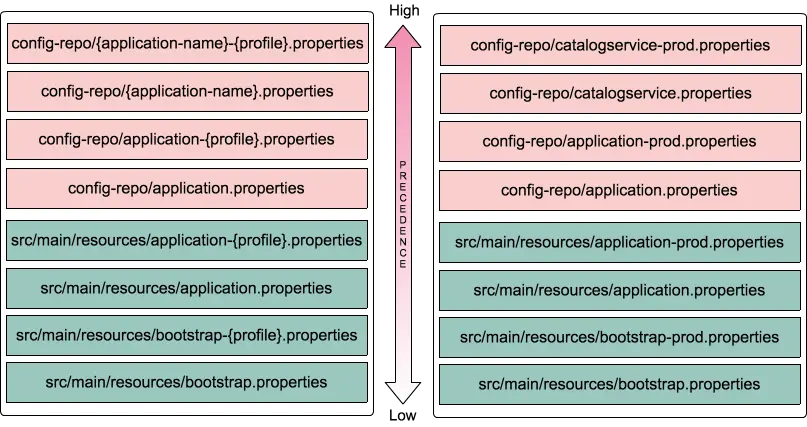
Now that we know there are many ways to provide configuration properties in many files, such as application.properties, bootstrap.properties, and their profile variants inside the application’s src/main/resources and {application-name}-{profile}.properties, application-{profile}.properties in config-repo.
The following diagram shows the precedence of configuration properties from various properties locations.
Refresh properties at runtime
Let us see how we can update the configuration properties of catalog-service at runtime without needing to restart the application.
Update the catalogservice.properties in the config-repo git repository and commit the changes. Now, if you access http://localhost:8181/env, you will still see the old properties.
In order to reload the configuration properties, we need to do the following:
- Mark Spring beans that you want to reload on config changes with
@RefreshScope. - Issue an http://localhost:8181/refresh request using the POST method.
To test the reloading behavior, let’s add a property name=Siva in config-repo/catalogservice.properties and commit it.
Create a simple RestController to display the name value as follows:
@RestController
@RefreshScope
class HomeController
{
	@Value("${name}")
	String name;

	@GetMapping("/name")
	public String name()
	{
		return name;
	}
}
Now access http://localhost:8181/name, which will display Siva. Now change the property value to name=Prasad in config-repo/catalogservice.properties and commit it.
In order to reload the config changes, trigger an http://localhost:8181/refresh request using the POST method and again access http://localhost:8181/name, which should display Prasad.
But issuing /refresh requests manually is tedious and impractical in the case of a large number of applications and multiple instances of the same application. We will cover how to handle this problem using Spring Cloud Bus in the next post.
Spring Cloud Tutorials – Auto-Refresh Config Changes using Spring Cloud Bus.
The source code for this article is at https://github.com/sivaprasadreddy/spring-cloud-tutorial.
Related content
- Spring Cloud Tutorials – Auto Refresh Config Changes using Spring Cloud Bus
- Should you use Lombok? Or, is it bad for you?
- My attempt to understand why people perceive Java as complex
- Improve JPA application performance using HypersistenceOptimizer
- Tutorials